How to Use
The author team tried to develop a website that is in large parts self-explanatory. The intro-page is divided into four buttons. If you read this, you obviously found the How to use button.
As soon as new tools are realized, you'll find under this button descriptions about the tools' conceptual framework and an introduction on how to manipulate the software.
Technical Implementation
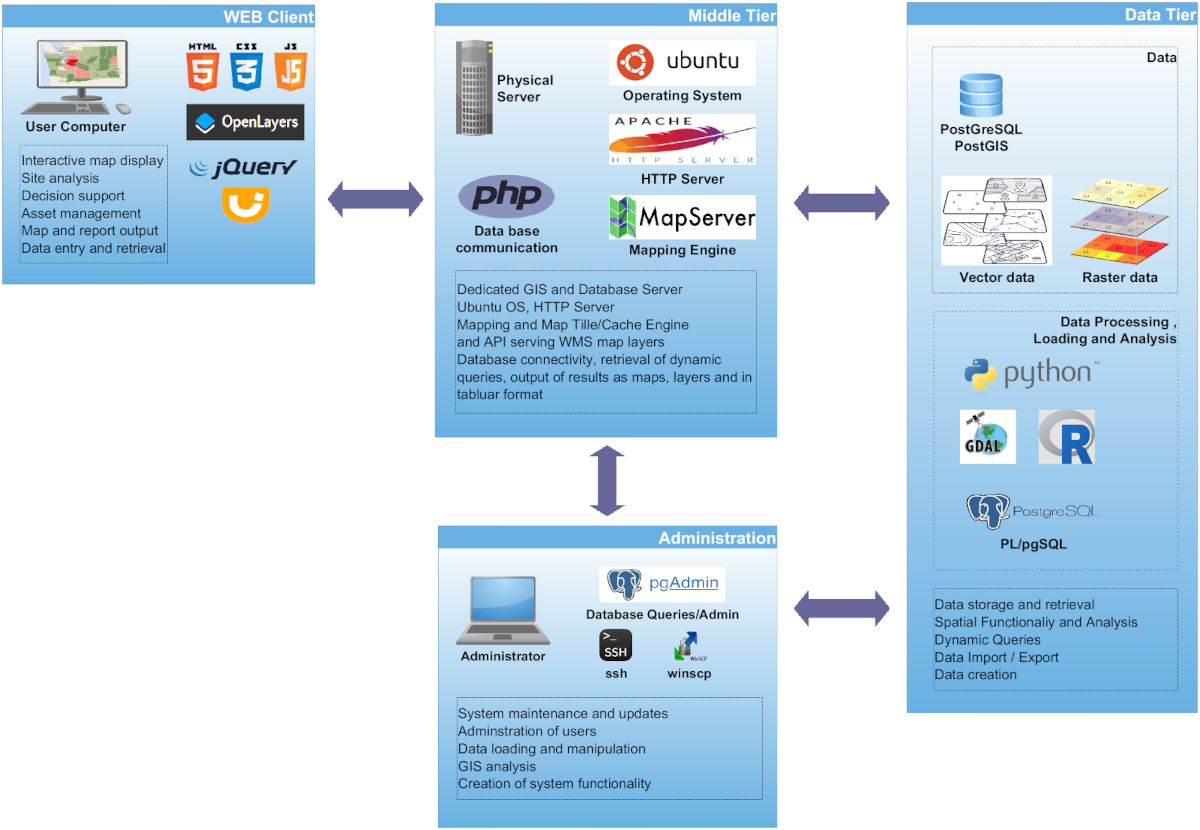
The entire toolbox was realized based on open source software and can be easily extended or applied to other regions of the world. The server implementation, in summary, is based on the following software stack:
- OS: Ubuntu Linux
- Web Server: Apache
- GIS Server: MapServer
- Database: PostgreSQL + PostGIS
- Geospatial Tools: PROJ, GDAL/OGR
- Web Tech: JavaScript, jQuery, PHP, Python, OpenLayers
- Analysis: R
Land Evaluation
Under the button Land Evaluation you'll find a general land evaluation tool (LET) for eastern West Africa that was developed strictly based on the FAO framework for land evaluation. A similar tool was developed for Tanzania in Eastern Africa that you can find here.
A specific application of the LET is the micro dosing. Micro dosing is an agricultural technology that uses hill-placed fertilizer application in order to reduce application rates but sustainably increase crop yields. Because the suitability rating for micro-dosing partly reverses the evaluation logic used for crop suitability – for example, soils with lower organic carbon or higher clay content that are less suitable for crops may actually benefit more from micro-dosing – this application has its own dedicated tool with adapted parameterizations. A link to a publication you'll find here (micro dosing publication).
Since the micro dosing technology reduces costs for fertilizer and has a reduced risk for return on investment, it is interesting to identify suitable intervention regions. This is possible via this tool.
Microdosing Tool
In order to demonstrate how such an application could work, the micro-dosing technology was parameterized. Micro-dosing refers to the hill-placed fertilization of crops in small amounts (several kg per hectare). This technology was primarily developed for subsistence farmers with limited investment capacity. Since the micro dosing technology reduces costs for fertilizer and has a reduced risk for return on investment, it is interesting to identify suitable intervention regions. The tool uses the same FAO-based suitability framework as the LET but with parameterizations specific to Pearl Millet under micro-dosing conditions, evaluating soil pH, precipitation, clay content, and organic carbon.
Results and Data
The Results and Data button leads to regionalized data, maps and results that have been collected during the DecLaRe project. These concern, for example, drone images or soil maps at village scale in the intervention zones.
Other Tools
You'll find under Other Tools a collection of specialized tools that complement the Land Evaluation framework:
Suitability for Microdosing Tool
Determines the suitability of an area for using the microdosing (fertilizer) application approach. This tool uses the same calculation method as the Land Evaluation Tool, however note that the default input layers are different and the suitability ranges for some of the input parameters (GIS layers) are reversed compared to the LET tool.
Micronutrient Chain Tool
A third tool addresses the micro-nutrient chain. The micro-nutrient chain is a concept that hypothesizes that micro-nutrient deficiency in human nutrition among subsistence households is related to the natural environment. The parent rocks provide, at the landscape scale, the micro-nutrient stock; soils make a portion of it available to plants and crops, which in turn nurture livestock and the human population. The tool allows identification of potential regions where specific micro-nutrient deficiencies may be expected.
Point Calculator
The Point Calculator allows users to evaluate land suitability at specific locations using measured soil and climate data rather than raster-based spatial datasets. Users can either click on the map to extract values from existing data layers or manually enter field and laboratory measurements.
Transport Cost Calculator
The Transport Cost Calculator estimates the cost of transporting agricultural products from a production location to a market or other destination using the actual road network. Users select a start and end point on the map, choose a product type and quantity, and the tool calculates the shortest route and cost estimate.
For detailed descriptions of each tool and web links, visit the Other Tools page.